
How to use the Kalodata promo code CHAWTIN at checkout
Updated
CHAWTIN is a Kalodata promo code that takes 10% off Starter and Professional plans in supported data markets. Combined with yearly billing, it gives a total saving of 25% on the United States package compared with paying monthly for 12 months.
This guide walks through each step of the checkout, shows what a working code looks like, and explains what to do if the discount does not appear.
Want the code right away? See our Kalodata promo code page.
Use code CHAWTIN for a 25% total saving on yearly plans, or 10% off monthly.
Claim discountWhat CHAWTIN saves you
The biggest saving comes from stacking the code on a yearly plan. On the US package, Starter costs $550.80 if you pay $45.90 a month for a year. The yearly checkout is $459.00, and CHAWTIN brings it to $413.10. Professional goes from $1,198.80 over 12 months to a yearly checkout of $999.00, then $899.10 with the code. Both work out at 25% less.
On monthly plans, CHAWTIN takes 10% off each payment in supported markets. US Starter drops from $45.90 to $41.31, and US Professional from $99.90 to $89.91.
Step 1: open the Kalodata pricing page
Use the Claim discount button on this page. It opens the Kalodata pricing page with our referral attached, which also keeps the CHAWTIN offer connected to your order. If you do not have an account yet, Kalodata asks you to sign up first. Signing up is free and the 7-day trial does not need a card.
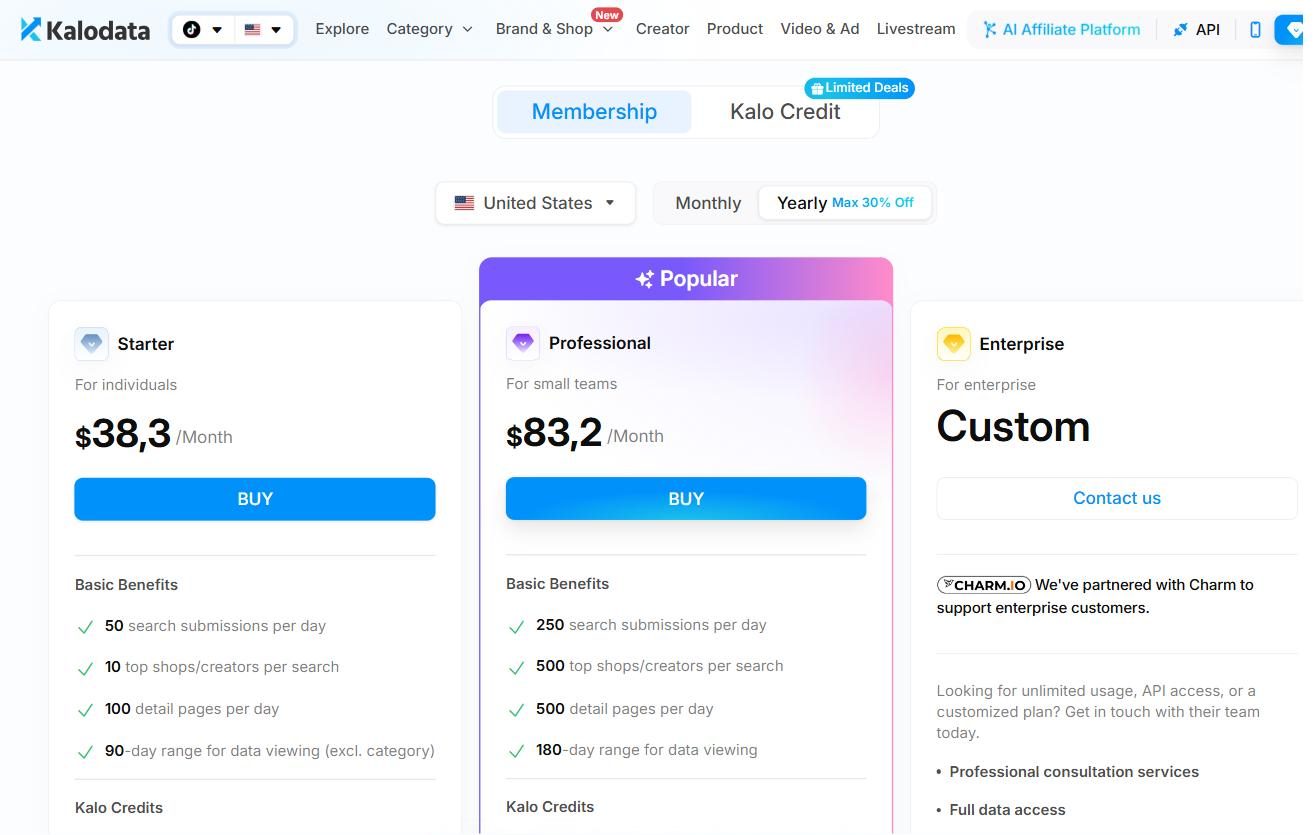
Step 2: choose your data market
Near the top of the pricing page there is a region selector. This is the data market: the TikTok Shop country whose data you want to analyse. It is not about where you live. A seller in Canada who sells into the US should pick the United States package.
CHAWTIN works in these markets: United States, the US, UK & EU bundle, United Kingdom, Germany, France, Italy, Spain, Brazil and Mexico. In our tests it was rejected in Indonesia, Malaysia, Thailand, Vietnam, the Philippines, Singapore and Japan.
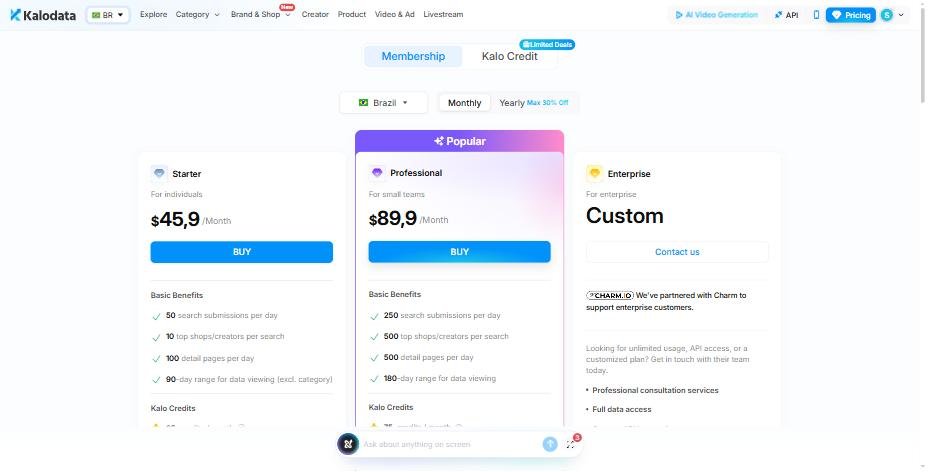
Use code CHAWTIN for a 25% total saving on yearly plans, or 10% off monthly.
Claim discountStep 3: pick monthly or yearly billing
Switch between Monthly and Yearly at the top of the plan cards. Yearly shows a lower per-month price because Kalodata discounts annual payment. If you plan to use the tool for most of the year, yearly plus CHAWTIN gives the biggest total saving.
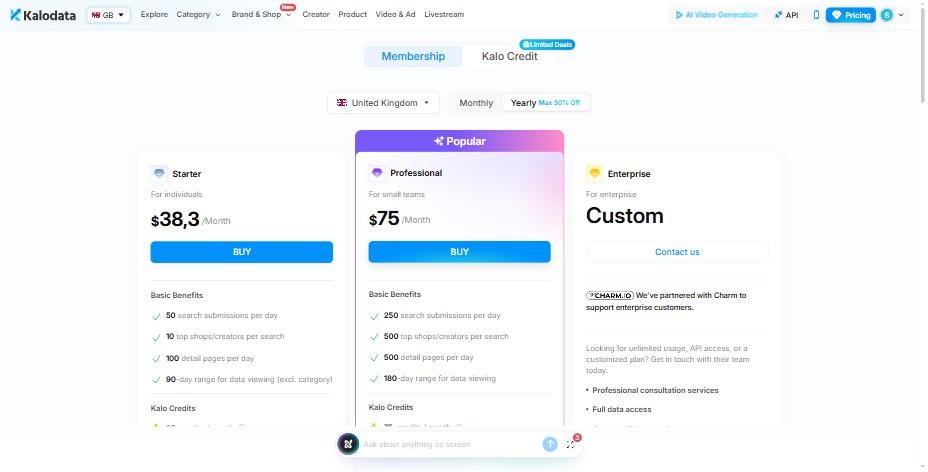
Step 4: choose Starter or Professional
Click the button on the plan you want. Starter suits solo sellers and product testing. Professional suits heavier daily use. You can compare both on the pricing page before you continue.
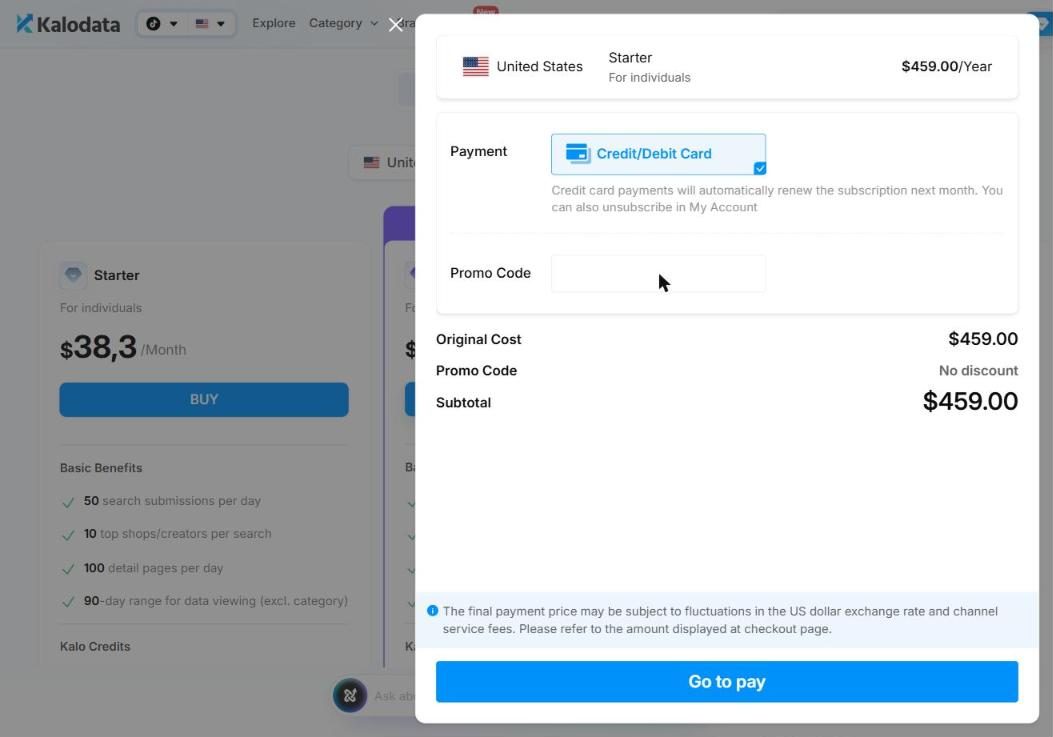
Step 5: enter CHAWTIN in the promo code field
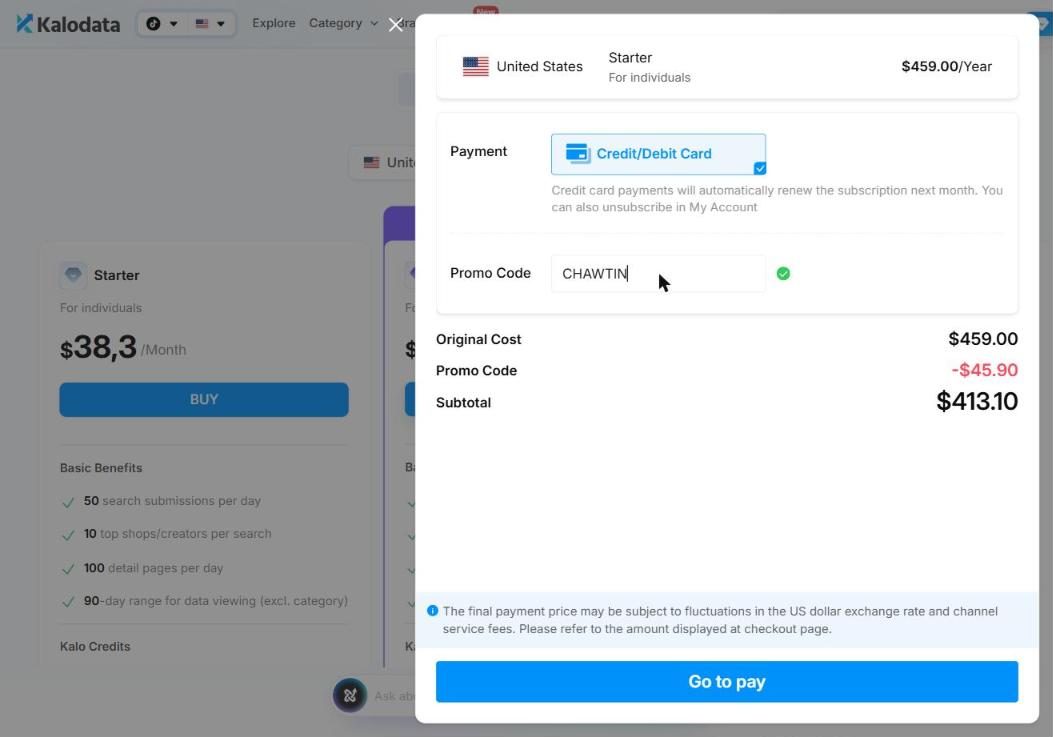
On the checkout screen you will see the order summary with the plan, billing period and price. Find the promo code field, type CHAWTIN in capital letters with no spaces, and click apply.
When the code works, a discount line appears and the total drops. For example, a US Starter yearly checkout changes from $459.00 to a final total of $413.10, a saving of $45.90. Check that the total has changed before you pay.
Step 6: pay and confirm
Finish payment as normal. The discounted total is what you are charged. Keep the confirmation email in case you need to contact Kalodata support about billing later.
What to do if CHAWTIN doesn't work
Most problems come down to a few simple things. Work through this list.
- Check the spelling. The code is CHAWTIN, all capitals, with no spaces before or after.
- Check the data market. In Indonesia, Malaysia, Thailand, Vietnam, the Philippines, Singapore and Japan the code is not accepted, so the price stays the same.
- Make sure you are on the web checkout. App Store prices can be higher and in-app purchases may not have a promo code field.
- Remove any other code first. Kalodata checkout takes one promo code at a time.
- Refresh the page and try again, or try a different browser if the field does not respond.
If your market doesn't accept the code
There is no coupon to apply in unsupported markets, and you do not need one to get a lower price. Choose yearly billing and Kalodata's own discount applies automatically. In our checkouts that saving ranged from 25% in Japan Professional and Vietnam Starter up to 48.9% for Vietnam Professional. Use the Claim discount button to go straight to the pricing page and pick yearly there.
Using CHAWTIN on the US, UK & EU bundle
The bundle works the same way as a single market. Select US, UK & EU in the region selector, pick your plan and billing, then enter CHAWTIN at checkout. Starter monthly goes from $69.91 to $62.92, and Professional monthly from $129.90 to $116.91. On yearly billing, Starter drops from $699.00 to $629.10 and Professional from $1,299.00 to $1,169.10, a 25% total saving against paying monthly for a year.
Check your total before you pay
It only takes a few seconds to confirm the code has worked. Compare the total on screen with these US checkout figures.
Starter monthly: $45.90 before the code, $41.31 after. Professional monthly: $99.90 before, $89.91 after. Starter yearly: $459.00 before, $413.10 after. Professional yearly: $999.00 before, $899.10 after.
In other supported markets the amounts differ, but the pattern is the same. The discount is 10% of the plan price and appears as its own line. In the UK, Germany, France, Italy and Spain, for example, Professional monthly goes from $89.90 to $80.91. In Mexico, Starter monthly goes from $22.90 to $20.61.
Does the code renew with your plan?
The checkout shows the discount for the payment you are making. Kalodata sets the renewal terms, so check your billing settings or the confirmation email to see what your next payment will be. If you are on monthly billing and plan to stay for a year, switching to yearly with CHAWTIN is usually the cheaper route.
Common mistakes to avoid
The most common mistake is choosing the wrong data market. People often pick the country where they live, then find the data does not match the shop they sell in. Always pick the TikTok Shop market you want data for.
The second is paying before checking the total. If the discount line is missing, stop and work through the troubleshooting list above before you confirm.
The third is buying in the app. App Store prices can be higher, and you may not see a promo code field at all. Use the website for the best price.
What about KDATAPROMO?
KDATAPROMO is a second code that also gives 10% off monthly or yearly plans in supported markets. It is an alternative, not an extra. You cannot stack it with CHAWTIN, so pick one. We recommend CHAWTIN because it is the code we have tested across every supported market.
Use code CHAWTIN for a 25% total saving on yearly plans, or 10% off monthly.
Claim discountFAQ
Where do I enter the Kalodata promo code?
On the checkout screen, after you choose a plan and billing period. Type CHAWTIN into the promo code field and click apply.
Does CHAWTIN work on monthly plans?
Yes. It takes 10% off monthly plans in supported data markets, for example US Starter from $45.90 to $41.31.
Can I use two Kalodata codes together?
No. Kalodata accepts one promo code per order, so use CHAWTIN on its own.
Why was my code rejected?
The most common reasons are a typo, an unsupported data market such as Japan or Thailand, or buying through the app instead of the website.