
Kalodata vs FastMoss: an honest comparison for TikTok Shop sellers
Updated
Kalodata and FastMoss are two of the best known research tools for TikTok Shop. Both help you find products that are selling, see which shops and creators drive those sales, and study the videos and livestreams behind them. If you are choosing between them, the real question is which one fits the way you work.
We run a Kalodata promo code site, so you should know where we stand. We have checked Kalodata's prices at real checkouts. FastMoss plan details in this guide come from its official pricing page, checked in October 2026, and we link to FastMoss for anything we have not tested ourselves. That keeps the comparison fair.
Want the code right away? See our Kalodata promo code page.
Use code CHAWTIN for a 25% total saving on yearly plans, or 10% off monthly.
Claim discountWhat both tools do
At their core, Kalodata and FastMoss answer the same questions. Which products are selling on TikTok Shop right now? Which shops are growing? Which creators move the most units? Which videos and livestreams are behind a spike in sales?
Both tools organise this into sections for products, shops, creators, videos and livestreams, with rankings, filters and estimated sales data. If you are new to TikTok Shop research, either tool will show you far more than browsing the app by hand.
Where Kalodata stands out
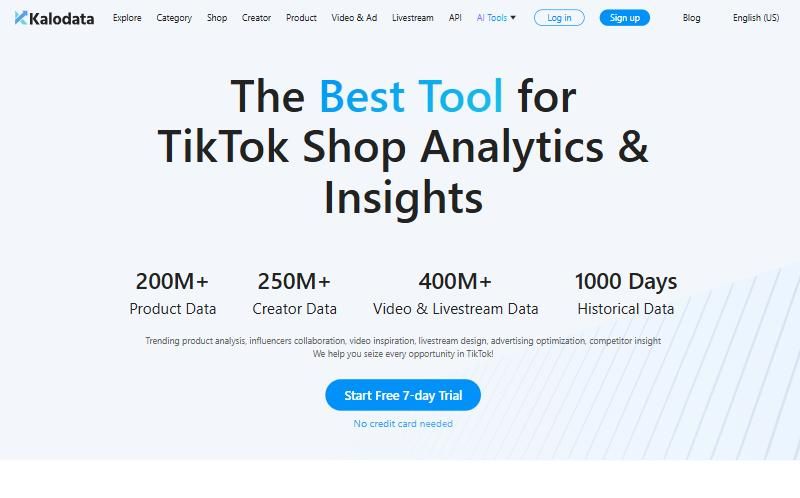
Kalodata is built around clean dashboards and fast filtering. Many sellers like how quickly you can go from a trending product to the shops selling it and the creators promoting it, then to the exact videos that drove the sales.
Kalodata also sells its access by data market. You pick the TikTok Shop country you want data for, such as the United States, the United Kingdom, Germany, Brazil or Mexico, and pay for that package. There is also a US, UK & EU bundle for sellers who work across those markets. This makes pricing transparent: you pay for the market you research.
Kalodata offers a 7-day free trial with no card needed, which makes it easy to test before paying.
Where FastMoss may suit you
FastMoss covers a similar set of TikTok Shop data and is popular with sellers in several regions. Some users prefer its layout or the specific way it presents creator and video data. Its plans, limits and market coverage are set differently from Kalodata's, so the better value depends on what you need.
FastMoss prices by plan tier, and its higher tiers add creator outreach features such as daily creator contacts and AI video transcription. Prices vary by plan and billing period, so check fastmoss.com/pricing for current numbers, and compare the plan you would actually buy, not the cheapest headline price.
Use code CHAWTIN for a 25% total saving on yearly plans, or 10% off monthly.
Claim discountFastMoss plans at a glance
FastMoss sells four plans: Basic, Pro, Team and Enterprise, which is custom priced. Pro carries the highest self-serve limits, including 300 creator contacts a day, which matters if you do a lot of outreach.
The details below come from FastMoss's official pricing page in October 2026. We do not quote dollar prices because they vary by plan and billing period. Check fastmoss.com/pricing for current prices.
| Feature | Basic | Pro | Team | Enterprise |
|---|---|---|---|---|
| Search attempts per day | 150 | 300 | 150 | Custom |
| Data exports per month | 10 | 100 | 10 | Custom |
| Creator contacts per day | 5 | 300 | Not stated | Custom |
| AI video transcription | 1 trial | 10 per day | Not stated | Custom |
| Historical data range | 90 days | 90 days | 90 days | Custom |
| Accounts included | 1 | 1 | 1 | Custom |
Key differences
The two tools structure pricing differently, which changes what you pay for.
- Kalodata prices by TikTok Shop data market: you pick the country package you want data for, such as the United States or Mexico, then Starter or Professional.
- FastMoss prices by plan tier, with daily usage limits on searches, data exports and creator contacts. Heavier use means a higher plan.
- If you do a lot of creator outreach, FastMoss Pro is the plan to look at, with 300 creator contacts a day compared with 5 on Basic.
How to compare them fairly
The best way to choose is to run the same test in both tools. Here is a simple method.
- Pick three products in your niche that you already know are selling.
- Look each one up in both tools and compare how easy it is to find the shops and creators behind it.
- Check how recent the data feels and whether the trends match what you see in the TikTok app.
- Try the filters you would use every week, such as category, price range and growth.
- Note which tool gets you to a decision faster. That is usually the one worth paying for.
The questions that matter most
Market coverage comes first. If you sell into the US, make sure the tool and plan you choose include strong US data. If you sell in Europe or Latin America, check coverage for those markets specifically. With Kalodata, this is the data market package you select at checkout.
Next is daily workflow. A tool you open every morning needs to feel fast and clear. Small differences in layout add up over months.
Then there is cost over a year. Monthly prices are easy to compare, but most sellers who stick with a tool end up paying for 12 months. Compare yearly totals, including any discounts you can actually get at checkout.
What Kalodata costs with CHAWTIN
If Kalodata wins your test, the cheapest way to pay for a full year is yearly billing plus the code CHAWTIN. On the United States package, Starter is $550.80 if you pay $45.90 a month for 12 months. The yearly checkout is $459.00 and CHAWTIN brings it to $413.10, a 25% total saving. Professional goes from $1,198.80 over 12 months to $899.10 yearly with the code, also 25% less.
If you prefer monthly billing, CHAWTIN takes 10% off each month in supported markets: US Starter becomes $41.31 and US Professional becomes $89.91. In Mexico the combined yearly saving is even higher, at 36.8% on Starter and 38.4% on Professional.
Pricing models compared
Kalodata prices by data market and plan. You choose a TikTok Shop country, then Starter or Professional, then monthly or yearly billing. That makes it easy to see exactly what you pay for, and it means sellers in cheaper markets such as Mexico pay less. Mexico Starter is $22.90 a month, or $173.70 a year with CHAWTIN.
FastMoss uses its own plan structure. Before comparing, write down the markets you need and how often you will use the tool. Then price the matching plan in each tool for a full year, not just one month.
Using both tools during a trial
You do not have to pick blindly. Both tools offer a 7-day free trial with no credit card, so you can run both trials in the same week at zero cost. FastMoss also says there is no auto-renewal and no charge after the trial ends. Run the same product test in both during the same week so the data covers the same period.
Keep notes as you go. A short table with each product, what each tool showed and how long it took to find is often enough to make the choice obvious.
Who should pick which
Pick Kalodata if you sell or research in the US, the UK, Europe, Brazil or Mexico and want a clear interface with pricing tied to the market you use. You also get the CHAWTIN saving in those markets: 25% in most of them with yearly billing, and up to 38.4% in Mexico.
Consider FastMoss if you already use it comfortably, or if its plan structure fits your markets better after you compare yearly totals. The best tool is the one you will open every day.
Our honest take
There is no single winner for every seller. Both are serious tools with real data. If you mainly research US, UK or European TikTok Shop markets and like a clear, fast interface, Kalodata is a strong choice, and its free trial makes it easy to check. If you already know FastMoss and its layout suits you, there is no need to switch just because another tool exists.
Whatever you choose, test with your own products, compare yearly totals, and only pay for the market data you actually use.
Use code CHAWTIN for a 25% total saving on yearly plans, or 10% off monthly.
Claim discountFAQ
Is Kalodata better than FastMoss?
It depends on your markets and workflow. Test both with the same products and pick the one that gets you to decisions faster.
Does Kalodata have a free trial?
Yes. Kalodata offers a 7-day free trial with no credit card needed.
How much does Kalodata cost?
On the US package, Starter is $45.90 a month and Professional is $99.90 a month. Yearly with CHAWTIN costs $413.10 and $899.10.
Can I use a promo code on FastMoss?
Yes. The code FAST50 works at FastMoss checkout. It is a referral discount applied on top of FastMoss's annual billing discount, not 50% off. CHAWTIN is a Kalodata code and only works on Kalodata checkouts.